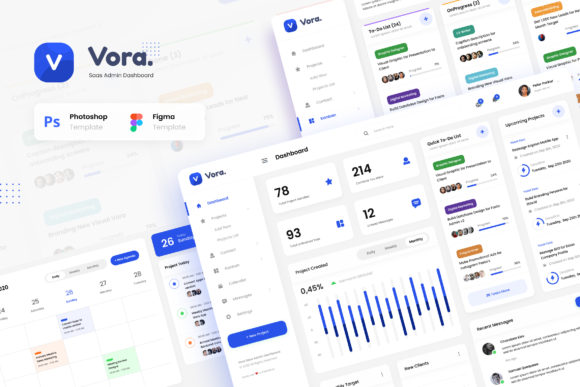
Vora - Saas Admin Dashboard UI Design
In the modern digital landscape, the interface between a user and their software is often the deciding factor in whether a project succeeds or fails. Whether you are managing a complex team, tracking a calendar of events, or organizing a Kanban board for agile development, the visual clarity and functional efficiency of your dashboard matter immensely. Vora - Saas Admin Dashboard UI Design addresses this critical need by providing a robust foundation for building stunning, eye-catching admin panels. This template is not merely a collection of pretty images; it is a strategic asset designed to streamline the creative process and ensure that your application looks professional from the very first line of code.
The design world has shifted towards clean, data-rich interfaces that do not overwhelm the user. Vora fits perfectly into this paradigm, offering a solution that balances aesthetic appeal with practical utility. For professionals ranging from freelancers to small business owners, the time spent designing a dashboard from scratch can be prohibitive. By leveraging a pre-structured, high-quality template, you can redirect your energy toward solving actual business problems rather than wrestling with layout grids and color palettes. This approach aligns with a process-oriented mindset where preparation and execution go hand in hand.
Understanding the Core Components of the Template
To truly appreciate how Vora - Saas Admin Dashboard UI Design integrates into your workflow, one must look at the specific components included in the package. The template provides six unique and modern User Interface screens, delivered in both PSD and Figma formats. This dual-format availability is crucial for flexibility. If your team relies on Adobe Photoshop for pixel-perfect editing, you have that capability. However, if you prefer the component-based architecture of Figma for collaborative prototyping, the template adapts seamlessly to that environment.
The six main pages cover the essential functions required for a comprehensive SaaS application:
- Dashboard: The command center where key metrics and overview statistics are displayed.
- Projects: A dedicated space for managing ongoing initiatives, deadlines, and resource allocation.
- Contacts: An organized directory for managing client information and communication logs.
- Kanban: A visual workflow tool ideal for agile teams tracking task progression.
- Calendar: A scheduling interface for planning meetings, events, and milestones.
- Message: An integrated communication hub for internal and external messaging.
Each of these screens is built with a 1920px width standard, ensuring that the design scales beautifully across modern desktop monitors. The use of free fonts from Google Fonts further simplifies the implementation process, removing the headache of licensing issues and font compatibility checks. This attention to detail ensures that the final product maintains high quality without requiring additional resources or budget.
Integrating Vora into Your Development Workflow
The true value of Vora - Saas Admin Dashboard UI Design emerges when you consider how it interacts with the broader software development lifecycle. In many projects, the UI design phase is treated as an isolated event, happening either before coding begins or after the backend logic is finalized. However, integrating a template like Vora allows for a more fluid, iterative process. You can start with the static design files to visualize the end product, then transition directly into development using the provided structure.
For developers, the well-documented nature of the files is a significant advantage. The documentation serves as a bridge between the visual design and the technical implementation. It guides you through the organization of layers, the naming conventions used, and the assets available. This reduces the cognitive load during the setup phase, allowing you to focus on customizing the template to fit specific brand requirements. Whether you are building a contact app, a team management tool, or a project manager platform, the consistent structure of Vora ensures that your customization efforts yield predictable results.
Consider the scenario of a freelancer launching a new SaaS product. Instead of spending weeks sketching wireframes and refining mockups, they can import the Vora templates into Figma. They can immediately begin modifying colors, swapping out icons, and adjusting layouts to match their brand identity. This accelerates the "time-to-market" significantly. Furthermore, because the files are easy to edit and customize, the same template can serve multiple purposes. You might start with the Projects screen for a beta launch and later expand to include the full suite of six screens as your feature set grows.
Practical Applications Across Different Industries
The versatility of this template makes it applicable to a wide range of industries and use cases. Let's explore how different types of users can leverage Vora - Saas Admin Dashboard UI Design to enhance their specific workflows.
Project Managers and Teams: For those overseeing complex projects, the Kanban and Calendar screens are indispensable. These interfaces allow managers to visualize bottlenecks and schedule resources effectively. The clean layout ensures that critical data points, such as task status and due dates, are immediately visible without clutter. When combined with the Message screen, teams can communicate contextually within the project environment, reducing the need to switch between multiple applications.
Educators and Content Creators: Bloggers, educators, and publishers often manage content calendars and author contacts. The Contacts and Calendar features in Vora provide a structured way to organize guest contributors, track publication schedules, and manage editorial workflows. The aesthetic appeal of the dashboard also enhances the user experience for anyone accessing the admin panel, making the administrative side of content creation less tedious.
Small Business Owners and Entrepreneurs: For entrepreneurs running their own operations, efficiency is paramount. A unified dashboard that combines project tracking, contact management, and financial overviews (in the main dashboard view) can act as a central nervous system for the business. The ability to easily edit the design means that as the business pivots or expands, the dashboard can evolve alongside it without requiring a complete redesign.
Ensuring Quality and Consistency in Implementation
When adopting a template, one common concern is maintaining consistency while introducing unique elements. Vora - Saas Admin Dashboard UI Design mitigates this risk by providing a cohesive design language across all six screens. The use of standardized spacing, typography, and color schemes creates a sense of familiarity for the user. This consistency is vital for usability; users should not have to relearn how to navigate the interface every time they move from the Projects page to the Messages page.
Quality control is another critical factor. The template includes high-quality screens that adhere to modern design standards. However, it is important to note that all images used in preview purposes are not included in the main files. This distinction is crucial for legal compliance and intellectual property rights. When implementing the template, you will need to source your own imagery or utilize placeholder graphics that fit your specific context. This requirement actually encourages designers to think critically about the visual assets they choose, ensuring that every image contributes meaningfully to the overall narrative of the application.
The PDF documentation provided with the download acts as a guide for maintaining this quality. It outlines best practices for editing, layer management, and export settings. Following these guidelines helps prevent common pitfalls such as broken links, missing assets, or inconsistent formatting. By adhering to the documented processes, you ensure that the final output is polished and professional.
Maximizing Efficiency Through Customization
One of the most powerful aspects of Vora - Saas Admin Dashboard UI Design is its adaptability. While the default configuration is impressive, the real potential lies in customization. Because the files are layered logically in both PSD and Figma, you can isolate specific elements to modify without affecting the rest of the design. Need to change the primary color to match your corporate branding? That can be done globally or locally depending on your needs. Want to add a new widget to the dashboard? The grid system supports seamless integration of new components.
This level of control empowers users to tailor the dashboard to their exact specifications. For instance, a marketing agency might prioritize the Contacts and Message screens, emphasizing client communication. Conversely, a software development firm might focus on the Projects and Kanban screens, highlighting task management. The template does not force a specific workflow; instead, it provides the tools to build the workflow that suits your objectives.
Furthermore, the use of open-source fonts and standard file formats ensures long-term viability. You are not locked into proprietary software or expensive licenses. As your skills grow or your team changes, the template remains accessible and editable. This sustainability is a key consideration for any long-term project. It allows for continuous improvement and iteration, ensuring that your dashboard remains relevant as user expectations and industry trends evolve.
Conclusion: A Strategic Asset for Modern Dashboards
In summary, Vora - Saas Admin Dashboard UI Design represents a strategic investment for anyone looking to build a high-quality admin interface. It bridges the gap between conceptual design and practical implementation, offering a streamlined path to creating stunning, functional dashboards. By providing six unique screens, extensive documentation, and compatibility with industry-standard tools like Photoshop and Figma, it removes the friction often associated with UI development.
Whether you are a seasoned developer, a creative entrepreneur, or a productivity enthusiast, this template offers the structure and flexibility needed to succeed. It encourages a thoughtful approach to design, where every element serves a purpose and every decision contributes to a cohesive user experience. By integrating Vora into your workflow, you are not just downloading a file; you are adopting a methodology that prioritizes efficiency, consistency, and quality. As you embark on your next project, consider how this template can elevate your work, turning complex administrative tasks into intuitive, visually appealing experiences.