Jobie Admin - Portal Dashboard UI Design
In the fast-paced world of digital recruitment, the interface between a hiring manager and their data can make or break efficiency. Jobie Admin - Portal Dashboard UI Design stands out as a comprehensive solution for professionals who need to manage complex job portals without getting lost in cluttered code or confusing layouts. Whether you are running a dedicated job portal app, a freelance marketplace, or an internal career management system, this template offers a streamlined path to a professional digital presence. It is not merely a collection of screens; it is a strategic tool designed to enhance user experience and streamline administrative workflows.
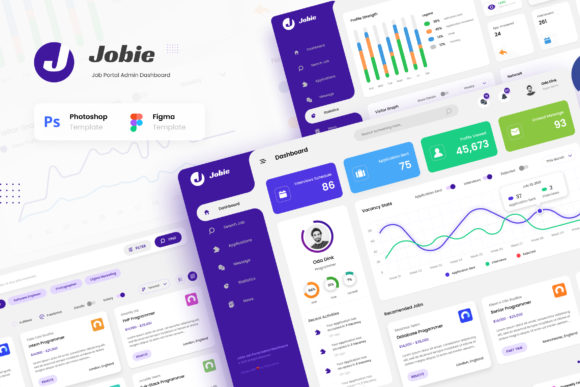
The core value of this design lies in its versatility. Modern dashboards must be more than just functional; they need to be intuitive and visually engaging. This template addresses that need by providing six unique and modern User Interface screens available in both PSD and Figma formats. These files allow developers and designers to easily edit and customize every aspect of the dashboard using industry-standard tools like Adobe Photoshop and Figma. The result is a stunning, eye-catching admin panel that elevates the perception of your brand while delivering high performance.
Key Characteristics and Structural Strengths
When evaluating a UI kit for a job application platform, the quality of the individual components matters immensely. Jobie Admin - Portal Dashboard UI Design excels in several critical areas that define a successful product. First, the layout is built on a 1920px width standard, ensuring that the content scales perfectly across modern desktop monitors and large displays. This attention to resolution detail means that text remains crisp, images are sharp, and interactive elements respond smoothly to user input.
The template includes six distinct pages that cover the essential functions of any hiring ecosystem. These pages are:
- Dashboard: A centralized hub for overviewing key metrics and recent activities.
- Search Job Applications: A robust filtering interface for managing incoming candidate data.
- Profile: Detailed views for managing individual user accounts and credentials.
- Companies: A section dedicated to overseeing corporate partners and employer profiles.
- Statistics: Visual representations of hiring trends, success rates, and market data.
- Main Files: Organized source files ensuring a smooth transition from design to development.
One of the most notable qualities of this design is its reliance on free fonts from Google Fonts. By utilizing these web-safe, open-source typefaces, the template ensures that your application loads quickly and maintains consistent typography across all devices. This choice eliminates licensing headaches and reduces the visual weight of the page, contributing to a cleaner, more modern aesthetic. Furthermore, the inclusion of PDF documentation provides a clear roadmap for implementation, making the setup process accessible even for those with limited design experience.
Practical Applications Across Industries
The utility of Jobie Admin - Portal Dashboard UI Design extends far beyond traditional recruitment agencies. In today's gig economy, the demand for flexible, scalable interfaces is higher than ever. Freelancers and entrepreneurs often build platforms that connect independent workers with clients, requiring a dashboard that can handle diverse user roles simultaneously. This template supports such complexity with its modular design, allowing you to highlight specific features relevant to your niche.
Educators and institutions also find value in these designs. Career services departments at universities often struggle with outdated software that fails to engage students. Implementing a modern UI like Jobie Admin can revitalize the student experience, making job searches feel less bureaucratic and more dynamic. Similarly, bloggers and publishers who monetize through job listings can use this template to create a professional-looking backend that inspires trust among advertisers and applicants alike.
For marketing professionals and business owners, the visual appeal of the dashboard translates directly to user engagement. A well-designed interface signals competence and reliability. When users interact with a polished platform, they are more likely to complete applications, update their profiles, and return for future opportunities. This increased engagement drives better data quality, which in turn improves the matching algorithms and overall effectiveness of the hiring process.
Enhancing Usability and Productivity
Efficiency is the lifeblood of any administrative role. Hiring managers often face the daunting task of sifting through hundreds of resumes daily. The Search Job Applications screen within this template is specifically crafted to reduce cognitive load. By organizing search parameters logically and presenting results clearly, the design minimizes the time spent on manual sorting. This allows managers to focus on what truly matters: evaluating talent and making strategic hiring decisions.
Communication is another area where this template shines. The Profile and Companies sections are designed to present information in a way that facilitates easy interaction. Clear typography and logical spacing ensure that contact details, work history, and company descriptions are immediately accessible. This transparency fosters better communication between employers, employees, and platform administrators, reducing errors and misunderstandings.
Branding is often overlooked in backend systems, yet it plays a crucial role in user retention. With the ability to customize colors, fonts, and layouts, you can align the dashboard perfectly with your existing brand identity. Whether you prefer a bold, corporate look or a soft, creative aesthetic, the flexibility of the PSD and Figma files allows you to tailor the appearance to match your vision. This customization ensures that the tool feels like an integral part of your business rather than a generic add-on.
Implementation Considerations and Best Practices
While the template offers a powerful foundation, successful implementation requires careful planning. It is important to remember that all images included in the preview are for demonstration purposes only and are not part of the main files. To maintain the integrity of your project, you should replace placeholder images with high-quality, relevant assets that reflect your specific industry. Using authentic imagery helps build trust with your users and enhances the overall realism of the interface.
When editing the files, take advantage of the layer organization provided in the PSD and Figma documents. Well-documented files make it easier to locate specific elements, such as buttons, icons, or form fields, without disrupting the rest of the design. If you are working with a team, ensure that everyone follows the same naming conventions and file structures to avoid confusion during the development phase.
Another consideration is responsiveness. While the template is optimized for 1920px widths, real-world usage involves a variety of screen sizes. During the development stage, test the interface on tablets and mobile devices to ensure that the layout adapts gracefully. Although the primary focus is on the desktop admin view, anticipating mobile access can provide a significant advantage in usability.
Finally, leverage the statistics module to drive decision-making. The Statistics screen is designed to visualize data effectively, but its true power comes from how you interpret and act on that information. Use the insights gained from the dashboard to refine your hiring strategies, adjust marketing campaigns, and improve the overall user journey. By treating the dashboard as a living tool rather than a static design, you can continuously optimize your platform for better outcomes.
In conclusion, Jobie Admin - Portal Dashboard UI Design represents a significant step forward for anyone looking to build or upgrade a job-related digital platform. Its combination of modern aesthetics, practical functionality, and ease of customization makes it an ideal choice for professionals ranging from solo freelancers to large-scale enterprise teams. By investing in a high-quality interface, you are not just improving the look of your website; you are enhancing the entire ecosystem of hiring and career management.