Griya - Real Estate Admin Dashboard UI
If you are managing a property business, whether it is renting out houses, selling listings, or handling multiple real estate projects, the way you organize your data matters just as much as the properties themselves. Griya - Real Estate Admin Dashboard UI is designed to transform how you view and manage your digital assets. It is not just a collection of screens; it is a complete visual system built to make complex information look clean, professional, and easy to navigate.
This template serves as a modern and elegant dashboard User Interface design specifically tailored for the real estate industry. It bridges the gap between technical functionality and aesthetic appeal, ensuring that your admin panel looks stunning and eye-catching while remaining highly functional. Whether you are a freelancer building a portfolio site, an entrepreneur launching a new agency, or a developer working on a commercial platform, this tool provides the foundation you need to succeed.
Why a Dedicated Real Estate Dashboard Matters
Real estate management involves juggling many different types of data simultaneously. You have active listings, potential buyers, current tenants, financial records, and customer feedback. Without a structured interface, this information can become overwhelming. A generic dashboard might force you to work around its limitations, but Griya - Real Estate Admin Dashboard UI anticipates the specific needs of property professionals.
The primary purpose of this template is to streamline operations. By providing a dedicated space for every aspect of your business, it reduces the time spent searching for information and increases the time available for actual deal-making. The design philosophy focuses on clarity, using ample white space and logical layouts so that users can find what they need instantly. This is crucial for anyone who wants to maintain a professional image while managing high-volume workflows.
Six Unique Screens for Complete Management
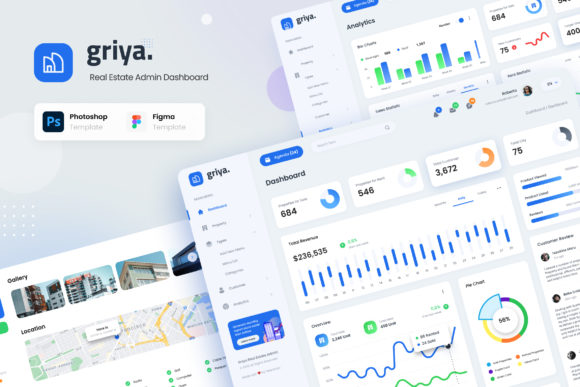
One of the standout features of this project is the inclusion of six unique and modern User Interface screens. Each screen addresses a critical function of running a real estate business, ensuring you have a comprehensive toolkit at your fingertips. These screens are provided in both PSD and Figma formats, giving you the flexibility to choose the workflow that suits you best.
- Dashboard: The command center of your operation. This page offers a high-level overview of your business health, displaying key metrics like total sales, active rentals, and recent inquiries at a glance.
- Order Page List: Ideal for tracking property transactions. Whether it is a sale or a lease agreement, this list view helps you manage the status of every deal efficiently.
- Order Detail: Once a transaction is selected, the detail page provides deep insights into the specifics, allowing you to review documents, client info, and payment history without leaving the interface.
- Customers Page: Managing relationships is key in real estate. This section allows you to view client profiles, track communication history, and segment your audience for better marketing.
- Analytics Page: Data drives decisions. This screen visualizes trends in property values, rental yields, and market demand, helping you strategize for future growth.
- Review Page: Reputation is everything. This area aggregates feedback from clients and tenants, making it easy to monitor satisfaction levels and respond to reviews promptly.
Seamless Customization for Every Skill Level
You do not need to be a graphic designer to make this template work for you. One of the most significant advantages of Griya - Real Estate Admin Dashboard UI is its ease of use. The files are fully layered and organized, making them incredibly easy to edit and customize using Adobe Photoshop and Figma. If you are familiar with basic design tools, you can modify colors, swap icons, or adjust layouts in minutes.
The template supports a standard 1920px width, which ensures that your designs look crisp on large monitors and scale down gracefully for smaller screens. Furthermore, the design utilizes free fonts from Google Font, meaning you won't run into licensing issues or extra costs when deploying your project. This attention to detail saves time and money, allowing you to focus on building your business rather than hunting for assets.
Practical Use Cases Across Industries
While the template is built for real estate, its versatility extends to various contexts. Imagine you are a small business owner launching a local property listing website. You can take these pre-designed screens, customize the branding with your company colors, and launch a professional-looking admin panel without spending weeks on development.
For freelancers and developers, this template acts as a powerful starting point. Instead of drawing every box and button from scratch, you can import the Figma or PSD files, tweak the content, and deliver a polished product to your clients faster. Educators teaching web design can also use this as a case study for modern UI principles, showing students how to create interfaces that are both beautiful and functional.
Even hobbyists interested in home automation or personal finance dashboards can adapt this layout. The logic behind organizing data—grouping related items, highlighting important numbers, and providing clear navigation—is universal. You can repurpose the "Order" sections to track household expenses or the "Customer" sections to manage contacts for a community club.
What to Consider Before You Start
As with any digital asset, there are a few practical things to keep in mind before diving in. First, ensure you have the necessary software installed. Since the main files are in PSD and Figma format, you will need access to Adobe Photoshop or the Figma desktop/web application to open and edit them effectively.
It is also important to note that all images used in the preview are for demonstration purposes only and are NOT included in the main files. You will need to source your own high-quality property photos or use stock imagery to populate the templates. This actually works in your favor, as it encourages you to use authentic images that represent your specific brand and properties, making the final result more personal and trustworthy.
Additionally, while the documentation is well-documented to guide you through the process, having a basic understanding of UI/UX principles can help you get the most out of the customization options. However, the structure is intuitive enough that even beginners can achieve professional results by following the included PDF guides.
Building a Stunning Digital Presence
In today's competitive market, the first impression often happens online. A clunky, outdated admin interface can signal a lack of professionalism to your team and clients alike. Griya - Real Estate Admin Dashboard UI solves this by offering a modern, elegant design that elevates the entire perception of your platform.
By choosing this template, you are investing in a solution that grows with your business. The modular nature of the design means you can easily add new features or update existing ones as your requirements change. Whether you are selling houses, managing rentals, or analyzing market trends, this dashboard provides the visual backbone you need to operate efficiently and impressively.
Ultimately, the goal is to make your workflow smoother and your interface more engaging. With six high-quality screens, flexible editing options, and a focus on real-world usability, this template stands out as a top choice for anyone looking to build a superior real estate management system. It combines the power of professional design with the simplicity of user-friendly tools, ensuring that your administrative tasks feel less like a chore and more like a strategic advantage.