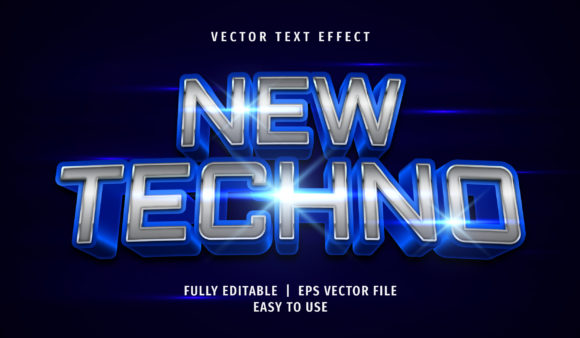
Text Effect - New Techno Text Style for Adobe Illustrator
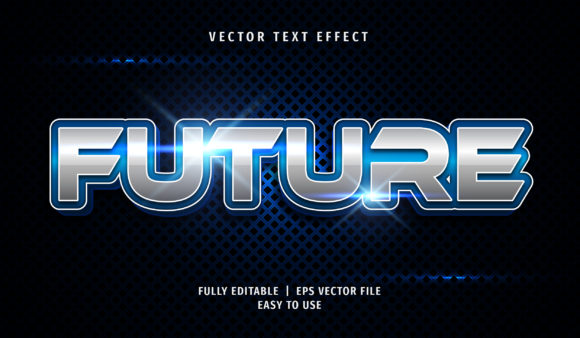
In a digital landscape saturated with generic sans-serif fonts and standard gradients, standing out requires more than just good copy; it demands visual impact. The Text Effect - New Techno Text Style bridges the gap between futuristic aesthetics and practical design workflows. This isn't merely a decorative font pack; it is a sophisticated tool designed to inject high-energy, industrial vibes into your projects while maintaining absolute control over your creative process.
Whether you are crafting a promotional banner for a tech startup, designing a poster for an electronic music event, or creating educational materials that need to capture attention instantly, this effect offers a streamlined solution. It transforms ordinary text into a commanding visual element that communicates innovation, speed, and precision.
Seamless Integration with Your Workflow
One of the most frustrating aspects of using complex text effects in graphic design software is the rigidity. Often, once a style is applied, changing the content becomes a nightmare of manual adjustments. The New Techno Text Style eliminates this friction entirely. Built specifically for Adobe Illustrator, it leverages the software's native capabilities to ensure maximum flexibility.
You do not need to be a vector expert to utilize this asset. The design philosophy centers on accessibility. You can apply the effect by simply clicking on the graphic style feature within Adobe Illustrator. This single action applies the intricate layers, gradients, and textures associated with the techno aesthetic instantly. If you need to tweak the look, you can directly modify the text properties without breaking the underlying structure of the effect.
This approach saves hours of repetitive work. Instead of manually recreating shadows, bevels, or neon glows for every headline, you apply the style once and let the system handle the complexity. It allows designers to focus on the message rather than the mechanics of rendering.
Instant Font Identification Without Installation
A common hurdle in professional design is working with client-provided files that use custom fonts which are not installed on your machine. When you open an EPS or AI format file containing the Text Effect - New Techno Text Style, the software handles missing fonts intelligently. By accessing the "character" panel in Adobe Illustrator, you can view the name of the specific font used within the effect, even if you haven't installed it locally.
This feature is invaluable for freelancers and agencies who frequently collaborate across different studios. It ensures that the visual integrity of the project remains intact during handoffs. You can see exactly what typeface drives the aesthetic, allowing you to make informed decisions about replacements or substitutions if necessary, all while preserving the original intent of the design.
Technical Specifications and File Structure
Understanding the technical backbone of a design asset is crucial for ensuring it meets your project requirements. The product is delivered in robust formats compatible with industry-standard workflows:
- File Format – AI CS6: The primary source file is optimized for Adobe Illustrator CS6 and later versions. This ensures broad compatibility with both legacy systems and modern workstations.
- File Format – EPS CS6: For users who need to import vectors into other applications like InDesign or older versions of Photoshop, the included EPS file provides a reliable fallback without losing vector quality.
- Image Preview in JPG: A high-resolution preview is included to help you visualize the final result before opening the heavy vector files.
Under the hood, the file is well-organized. Layers are grouped logically, separating the base text, the techno overlays, the lighting effects, and the background elements. This organization makes it incredibly easy to isolate specific components for animation or further editing. Furthermore, the asset is 100% scalable, meaning whether you are printing a business card or a billboard, the edges remain crisp and the details stay sharp.
Practical Applications Across Industries
The versatility of the Text Effect - New Techno Text Style extends far beyond simple decoration. Its ability to convey a sense of advanced technology makes it suitable for a wide array of real-world scenarios.
For marketers and entrepreneurs, this effect is perfect for landing pages and social media ads targeting a younger, tech-savvy demographic. The sharp angles and futuristic glow create an immediate association with cutting-edge products, increasing click-through rates by capturing the user's eye amidst cluttered feeds. In print advertising, such as flyers for nightclubs or gaming tournaments, the effect adds a tactile depth that mimics physical signage, making the print material feel premium.
Educators and bloggers can also benefit from this tool. Imagine a blog post about cybersecurity or artificial intelligence. Using a standard font might fail to set the mood. Applying this techno style to headers creates an immersive reading experience that aligns the visual tone with the subject matter. It enhances engagement by making the content feel dynamic and relevant.
Even freelance hobbyists find value here. Creating custom merchandise, t-shirts, or stickers often requires a unique look that stands apart from mass-produced items. The ease of use means that non-professionals can achieve results that look professionally vetted, boosting confidence in their creative output.
Strategic Benefits for Branding and Communication
Consistency is the cornerstone of effective branding. Because this effect is built on editable graphic styles, you can maintain a uniform look across all your collateral. Whether it is a website header, a presentation slide, or a printed brochure, the application of the New Techno Text Style ensures that your brand voice remains visually consistent.
This consistency translates to better user experience (UX). Users subconsciously recognize patterns; when they see the distinctive techno aesthetic, they immediately categorize the information as belonging to a specific brand identity. This reduces cognitive load and builds trust. Additionally, the full editable nature of the file means you can adapt the color palette to match seasonal campaigns or specific product launches without needing to recreate the entire effect from scratch.
Implementation Considerations
While the Text Effect - New Techno Text Style is powerful, successful implementation requires a bit of strategic planning. First, consider the context of your audience. While the style is excellent for tech and entertainment, it may clash with brands aiming for a minimalist, organic, or corporate conservative image. Use it where the "future" narrative fits naturally.
Secondly, pay attention to readability. The intricate details of techno effects can sometimes reduce legibility if the text size is too small or the contrast is too low. Always test your designs at actual viewing sizes. Ensure that the white space around the text allows the effect to breathe, preventing the design from becoming overwhelming.
Finally, leverage the layer organization. Don't be afraid to experiment. Since the file is fully editable, try removing certain shadow layers or adjusting the opacity of the outer glow to create variations that fit your specific layout constraints. The goal is to use the tool to enhance your message, not to let the effect overshadow the content itself.
By integrating this asset into your workflow, you gain a significant advantage in efficiency and visual quality. It removes the technical barriers to achieving a high-end look, allowing you to focus on what matters most: communicating your message effectively to your audience.