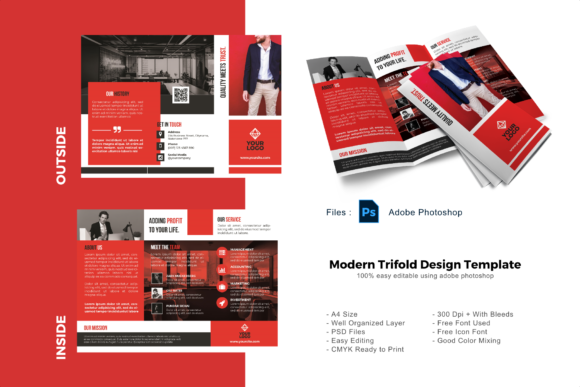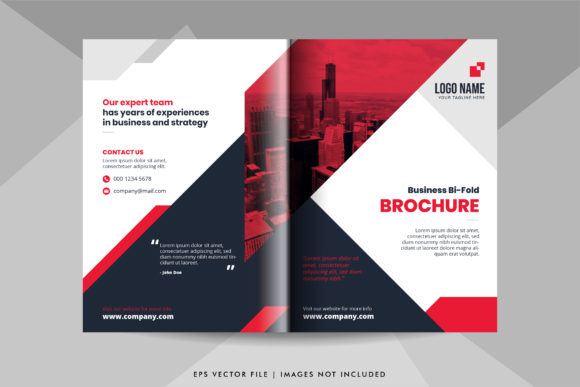
Red and Black Business Bifold Brochure
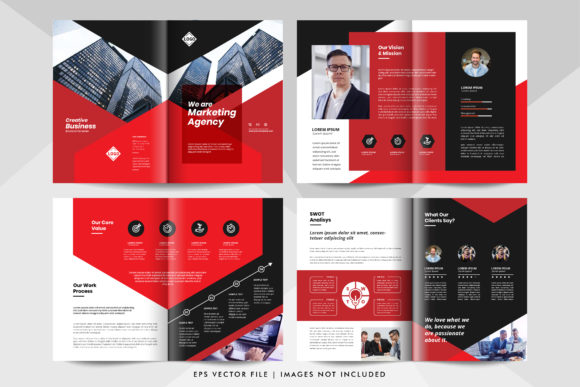
In the fast-paced world of professional networking, your first impression is often determined by a single physical object. That moment of truth happens when you hand over a Red and Black Business Bifold Brochure to a potential client or partner. This isn't just a piece of paper; it is a strategic tool designed to convey authority, creativity, and reliability in one swift motion. The striking contrast between deep crimson and sleek black creates an immediate visual impact that stands out against the sea of generic blue and white corporate materials.
Whether you are a freelancer pitching a new design concept, a real estate agent showcasing properties, or an educator presenting a curriculum, the right marketing collateral can make the difference between being remembered and being forgotten. This specific template offers a versatile foundation that allows you to customize every element to match your unique brand identity while maintaining a sophisticated aesthetic.
Why the Red and Black Combination Works
Color psychology plays a massive role in how your message is received. Red is universally associated with energy, passion, urgency, and power. It demands attention and stimulates action. Black, conversely, represents elegance, formality, stability, and mystery. When combined in a bifold layout, these colors create a dynamic tension that guides the reader's eye through the content logically.
The Red and Black Business Bifold Brochure leverages this psychological pairing to establish trust while simultaneously projecting confidence. Unlike flashy neon designs that might alienate conservative clients, this palette strikes a balance. It says, "We are bold enough to take risks, but serious enough to handle your business."
Unmatched Customization with 100 Vector Graphics
One of the most significant advantages of this template is its complete editability. The package includes 100 vector elements, which means every icon, shape, and decorative line can be manipulated without losing quality. Whether you need to scale an image up for a large display or down for a mobile preview, the sharpness remains intact. This is a crucial feature for professionals who need their materials to look crisp on everything from business cards to billboard-sized prints.
You are not stuck with a pre-set design. You have full control to:
- Change Colors: Adjust the shades of red and black to align perfectly with your existing brand guidelines.
- Resize Elements: Modify the size of graphics to fit specific text blocks or empty spaces.
- Swap Fonts: Replace default typefaces with your preferred fonts to ensure consistency across all your marketing channels.
- Rearrange Layouts: Move sections around to prioritize the information that matters most to your audience.
This level of flexibility ensures that the final product feels bespoke rather than templated. Clients can spot a copy-paste job from a mile away, but a fully customized brochure demonstrates a genuine investment in your project.
Practical Applications Across Industries
The versatility of this bifold format makes it suitable for a wide array of use cases. Because the design is clean yet impactful, it adapts well to various industries without looking out of place.
For Entrepreneurs and Startups: Launching a new venture requires making a strong statement. Use the brochure to outline your value proposition, showcase your team, and provide contact details. The high-contrast design helps highlight key statistics or call-to-action buttons, driving potential investors to engage with your business.
For Marketers and Agencies: If you run a creative agency, your own marketing materials must reflect your capabilities. A Red and Black Business Bifold Brochure serves as a portfolio piece in itself, demonstrating your ability to handle bold color schemes and complex layouts. You can include case studies, client testimonials, and service packages within the fold.
For Educators and Bloggers: Even non-profit organizations and educators benefit from professional branding. You can use this template to distribute course syllabi, workshop agendas, or digital resource guides. The structured bifold format keeps information organized and easy to digest for students or readers.
For Freelancers: As a solo operator, you wear many hats. A well-designed brochure acts as a tangible resume or service menu. Handing out a polished document during a meeting elevates your perceived value and professionalism compared to a simple email attachment.
Technical Specifications and File Formats
To get the most out of this asset, understanding the provided files is essential. The download includes two primary formats:
- EPS CS6 Files: This is the source file you will work with. It contains all the layers, vectors, and editable text fields. To utilize the full potential of the 100 vector graphics and editing features, you must open this file using Adobe Illustrator CS or CC.
- JPEG Previews: These images allow you to visualize the design before opening the heavy vector files. They are perfect for quick sharing with team members or clients for initial feedback.
It is important to note that while JPEGs are great for viewing, they are raster-based and cannot be edited. For any changes to color, text, or layout, the EPS file is your only option. Using Adobe Illustrator ensures that you maintain the integrity of the vector data, allowing for lossless editing.
Maximizing Efficiency and User Experience
Design is not just about aesthetics; it is about communication efficiency. The bifold structure naturally divides content into four distinct panels (two outside, two inside), which encourages a logical flow of information. Readers typically start with the front cover, unfold the brochure to see the inner left panel, then the center, and finally the back.
By utilizing the Red and Black Business Bifold Brochure, you guide your audience through a narrative arc. The front cover grabs attention, the inner panels deliver the core message, and the back panel provides the necessary contact information and social proof. This structured approach reduces cognitive load, making it easier for prospects to retain your key points.
Furthermore, the ability to edit fonts and colors directly impacts user experience. If your brand uses a specific font family, replacing the default text ensures a cohesive look that reinforces brand recognition. Similarly, adjusting the color palette to match your website or business cards creates a seamless omnichannel experience for your customers.
Considerations for Implementation
While this template is powerful, successful implementation requires a few practical steps. First, ensure you have the correct software installed. Since the file is an EPS CS6, older versions of Illustrator might struggle with newer features, so sticking to CS6 or later is recommended for compatibility.
Second, pay attention to print settings. Before sending your custom design to a printer, always check the bleed lines and color profiles. While the digital preview looks vibrant, CMYK printing can sometimes shift colors slightly. It is wise to request a physical proof if you are ordering a large batch.
Finally, keep your content concise. Just because you have space doesn't mean you should fill it all. High-end design relies on negative space to let the red and black elements breathe. Overcrowding the brochure with too much text dilutes the impact of the bold visuals. Focus on clear headlines, bullet points, and compelling imagery.
In conclusion, the Red and Black Business Bifold Brochure is more than a template; it is a comprehensive solution for professionals who demand excellence. With 100 editable vectors, full customization options, and a timeless color scheme, it empowers you to create marketing materials that are both beautiful and effective. Whether you are building a personal brand or scaling a business, this tool provides the foundation you need to communicate your value clearly and memorably.