PSD Photo Print Text Template 12: A Versatile Tool for Professional and Creative Projects
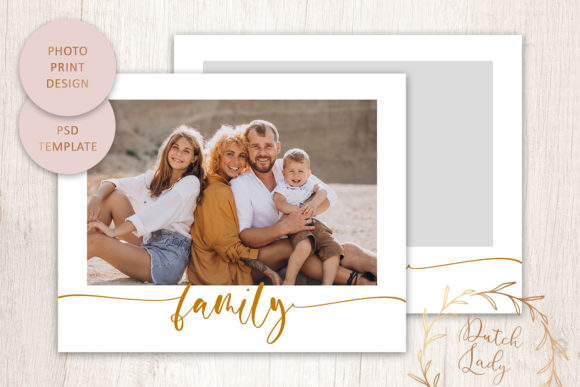
The PSD Photo Print Text Template 12 is a high-resolution, layered Photoshop file designed to streamline the creation of visually striking photo collages. Whether you're preparing marketing materials, crafting personalized gifts, or designing social media content, this template offers a flexible foundation that adapts to your specific needs. With its focus on usability, customization, and quality, it fits seamlessly into both professional workflows and personal creative projects.
Understanding the Features of PSD Photo Print Text Template 12
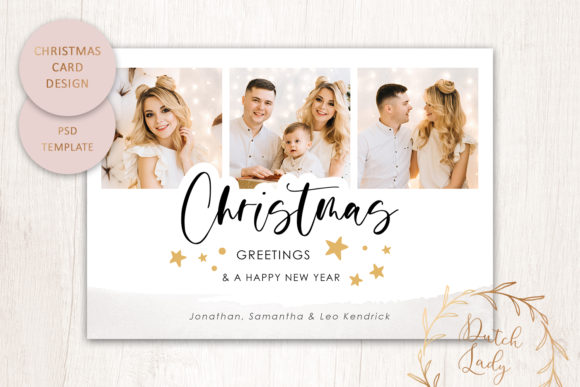
This template includes two high-resolution (300 dpi) layered .PSD files, which are ideal for printing at standard photo sizes of 10x8 inches and 20x16 inches. These dimensions align with common US photo print sizes, making it easy to produce professional-quality outputs without worrying about scaling issues.
One of the standout features is the inclusion of a photo mask, which allows users to insert their own images behind the design elements. This makes it simple to create personalized collages that reflect individual styles or brand identities. The text layer is fully customizable in terms of color, size, position, and even the font file used is included, ensuring that the typography matches your vision precisely.
Additionally, the background can be changed to any color, giving users the freedom to match the template to different themes or branding requirements. A link to detailed online instructions is also provided, helping users navigate the editing process with ease.
Integration into Workflow: Before, During, and After the Project
The PSD Photo Print Text Template 12 can be utilized at various stages of a project. For instance, during the planning phase, it can serve as a visual mockup to present ideas to stakeholders or clients. Its layered structure makes it easy to adjust elements before finalizing the design.
During the execution phase, the template acts as a time-saving asset. Instead of starting from scratch, users can quickly customize the text, background, and image placement to meet their project's specific requirements. This is particularly useful for professionals such as marketers, educators, and small business owners who need to produce multiple designs efficiently.
After the project is completed, the template can still be valuable. It can be repurposed for similar future projects, reducing the need to recreate the same layout from scratch. Additionally, the ability to print at local or online shops ensures that the final output meets high-quality standards, whether it’s for a client presentation or a promotional campaign.
Practical Implementation Tips and Workflow Examples
To make the most of the PSD Photo Print Text Template 12, start by organizing your assets. Keep all relevant images, fonts, and color schemes in a centralized folder. This helps maintain consistency and reduces the risk of errors when making adjustments.
Begin by importing your desired image into the photo mask layer. Ensure that the resolution of the image is compatible with the template's 300 dpi requirement. If needed, use Photoshop's resizing tools to maintain clarity and sharpness.
Next, modify the text elements. Experiment with different font sizes and colors to see how they interact with the background and image. Remember to consider readability, especially if the text will be viewed in different lighting conditions or printed on various paper types.
For those unfamiliar with Photoshop, the online instructions provided with the template are an invaluable resource. They walk users through each step, from basic edits to more advanced customizations. Following these guidelines can help ensure that the final product looks polished and professional.
A practical workflow might involve using this template alongside other graphic design tools such as Canva or Adobe Illustrator for additional elements. However, the layered structure of the .PSD file ensures compatibility with most design software, allowing for seamless integration into broader creative processes.
Preparing for Printing: Quality and Compatibility Considerations
Before sending the final design to print, it's crucial to verify that the file is set up correctly. Check that all layers are properly grouped and that no elements are hidden or locked. Also, confirm that the resolution remains at 300 dpi to avoid pixelation or blurriness in the printed output.
When selecting a print shop, choose one that offers the required photo print sizes (10x8 inches and/or 20x16 inches). High-quality photo or card stock paper is recommended to achieve the best results. Some print shops may offer online proofing services, which allow you to review the design before committing to a full print run.
It's also worth considering the purpose of the print. For example, if it's intended for display in a public space, using a more durable paper type may be necessary. On the other hand, if it's for personal use, a glossy finish might enhance the visual appeal.
Long-Term Use and Customization Possibilities
The PSD Photo Print Text Template 12 is not just a one-time-use asset. Its layered structure allows for repeated use and modification, making it a valuable addition to any designer's toolkit. Over time, you can build a library of customized templates tailored to your brand or personal style.
Customization possibilities extend beyond just text and images. You can experiment with different layouts, add icons or graphics, or incorporate additional text elements to create variations of the original design. This flexibility ensures that the template remains relevant across multiple projects and use cases.
Moreover, since the font file is included, there's no need to worry about licensing issues or font compatibility when sharing the final design with others. This makes it easier to collaborate with team members or clients who may need access to the file for further edits or revisions.
About the Shop: Dutch Lady Designs
Dutch Lady Designs is a small graphic design company based in the Netherlands, registered with the Dutch Chamber of Commerce. As a trusted provider of design resources, the company focuses on creating high-quality, user-friendly templates that cater to a wide range of creative needs.
Whether you're a professional designer looking for reliable assets or a hobbyist exploring new creative avenues, Dutch Lady Designs offers products that combine functionality with aesthetic appeal. Their commitment to quality and customer support ensures that users receive the best possible experience when working with their templates.
By choosing the PSD Photo Print Text Template 12, you're investing in a tool that supports both efficiency and creativity, helping you bring your ideas to life with minimal effort and maximum impact.