Merry Christmas Golden Style Text Effect
The holiday season demands visual impact. Whether you are designing a festive email campaign, a social media banner, or a high-end print invitation, the difference between a generic greeting and a memorable brand moment often lies in the typography. This is where the Merry Christmas Golden Style Text Effect transforms from a simple decoration into a strategic design asset. It captures the essence of luxury, celebration, and warmth that defines the holidays without relying on clichéd clip art.
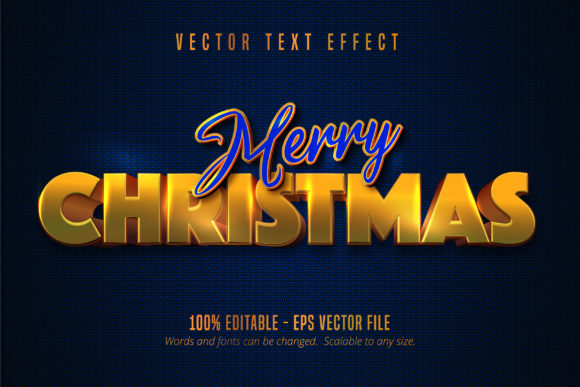
This specific resource is not merely a downloadable font file that opens in any text editor. Instead, it is a sophisticated vector-based effect designed for Adobe Illustrator. By leveraging the power of editable paths and gradients, this tool allows creators to manipulate light, shadow, and texture directly within the software. The result is a shiny, golden appearance that feels tangible and three-dimensional, set against a rich blue textured background that provides the perfect contrast to make the gold pop.
Why Vector-Based Effects Outperform Standard Fonts
In the world of digital design, scalability is non-negotiable. A standard raster image or a basic font file often loses quality when resized, leading to pixelation or blurry edges. The Merry Christmas Golden Style Text Effect operates on a different principle. As an EPS CS6 file format created specifically for Adobe Illustrator, it maintains 100% editability regardless of the output size. You can scale this text from a tiny mobile notification icon to a massive billboard, and the golden sheen remains crisp and sharp.
The core value here is control. Because this is an effect rather than a static typeface, designers can adjust the curvature, spacing, and weight of the letters while retaining the complex metallic gradient overlays. This flexibility is crucial for brands that need to maintain consistency across various media channels. If your marketing team needs to adapt a message for a newsletter versus a website header, this tool ensures the visual identity remains intact without requiring a redesign from scratch.
Adapting the Design for Diverse Audiences
Different platforms require different approaches to visual storytelling. For small business owners and entrepreneurs, the Merry Christmas Golden Style Text Effect serves as a powerful hook. Imagine a local bakery using this text on a flyer to announce their limited-edition holiday pastries. The golden hue implies premium quality, subtly suggesting that their products are special and worth the investment.
For educators and bloggers, the application might be more about engagement. A blog post featuring year-end reflections or gift guides can use this text as a featured header. The blue textured background offers a sense of depth and calm, balancing the excitement of the golden text. This combination creates a professional look that elevates the perceived authority of the content, encouraging readers to trust the information provided.
- Social Media Managers: Use the scalable nature of the file to create cohesive story highlights or cover images that stand out in crowded feeds.
- Freelance Designers: Offer this as part of a premium holiday package to clients who want a custom feel without the time cost of creating effects from scratch.
- Publishers: Integrate the text into digital magazines or e-books to add a touch of elegance to seasonal features.
Technical Precision Meets Creative Freedom
One of the most significant advantages of working with this Illustrator-specific file is the ability to customize the underlying elements. While the default presentation features a stunning blue textured background, the true potential lies in modification. Since the file is fully editable, you can swap the background texture for a snowy white, a deep red velvet, or even a neutral gray to match a corporate brand palette. The golden text effect itself can be tweaked by adjusting the gradient stops, allowing you to shift the tone from a bright, champagne-like yellow to a deeper, antique bronze.
This level of customization ensures that the final product does not look like a template. In an era where consumers are quick to spot generic stock imagery, the ability to tweak the lighting angles or the intensity of the shine makes the design feel bespoke. It demonstrates a commitment to detail that resonates with adult audiences aged 20 to 50, who appreciate authenticity and high-quality aesthetics.
Practical Applications for Marketing Campaigns
When launching a holiday promotion, clarity is key. The Merry Christmas Golden Style Text Effect is designed to be legible even at smaller sizes, making it ideal for call-to-action buttons or promotional badges. The high contrast between the shiny gold and the dark blue background naturally draws the eye, guiding the user's attention exactly where you want it.
Consider a scenario where a freelancer is designing a series of Instagram posts for a client. They can use the same base text but change the background texture for each post to represent different products. One post might feature a winter landscape texture, while another uses a subtle paper grain. The consistent golden text ties the series together, creating a unified campaign that looks polished and professional.
- Brand Consistency: Ensure the golden tones align with your brand's existing color scheme before applying the effect.
- Readability Checks: Always test the text against various backgrounds to ensure the message is clear and accessible.
- File Organization: Keep layers organized in Illustrator to easily toggle between the text effect and the background textures.
Maximizing Impact Without Overdesigning
There is a fine line between festive and overwhelming. Using a heavy golden effect requires a thoughtful approach to composition. The goal is to enhance the message, not obscure it. When integrating this text effect into a layout, give it room to breathe. Avoid cluttering the surrounding space with too many competing elements. Let the golden text be the hero of the design.
For those looking to experiment, try pairing the text with minimalist photography. A simple image of a pine branch or a single ornament can complement the luxurious feel of the gold without distracting from the typography. This balance creates a sophisticated atmosphere that appeals to modern sensibilities, moving away from the chaotic, colorful designs of the past toward something more refined and elegant.
Ultimately, the Merry Christmas Golden Style Text Effect is a tool for empowerment. It removes the technical barriers associated with creating realistic metallic text from scratch, allowing designers to focus on strategy and creativity. Whether you are a seasoned professional or a hobbyist exploring new techniques, this resource offers a reliable way to elevate your holiday projects. By understanding its capabilities and adapting it to your specific context, you can create visuals that not only celebrate the season but also communicate your brand's unique voice effectively.
As you begin your next creative project, remember that the best designs are those that serve a purpose. This text effect provides the foundation; your vision provides the direction. Use it to inspire, to inform, and to connect with your audience during the most wonderful time of the year.